
ACF – Auswahl-Feld erstellen:
Right Bottom
Right Center
Right Top
Center Bottom
Center Center
Center Top
Left Bottom
Left Center
Left Top
Standardwert: Center Center
Alternativ: Code Snippet erstellen mit folgendem Inhalt für Metaboxes.io (free):
<?php
add_filter( 'rwmb_meta_boxes', 'your_prefix_register_meta_boxes' );

function your_prefix_register_meta_boxes( $meta_boxes ) {
$prefix = '';

$meta_boxes[] = [
'title' => esc_html__( 'Untitled Field Group', 'online-generator' ),
'id' => 'untitled',
'context' => 'normal',
'fields' => [
[
'type' => 'select',
'name' => esc_html__( 'Hero Background Position', 'online-generator' ),
'id' => $prefix . 'hero_background_position',
'options' => [
'Left Top' => esc_html__( 'Left Top', 'online-generator' ),
'Left Center' => esc_html__( 'Left Center', 'online-generator' ),
'Left Bottom' => esc_html__( 'Left Bottom', 'online-generator' ),
'Center Top' => esc_html__( 'Center Top', 'online-generator' ),
'Center Center' => esc_html__( 'Center Center', 'online-generator' ),
'Center Bottom' => esc_html__( 'Center Bottom', 'online-generator' ),
'Right Top' => esc_html__( 'Right Top', 'online-generator' ),
'Right Center' => esc_html__( 'Right Center', 'online-generator' ),
'Right Bottom' => esc_html__( 'Right Bottom', 'online-generator' ),
],
'std' => 'Center Center',
],
],
];

return $meta_boxes;
}
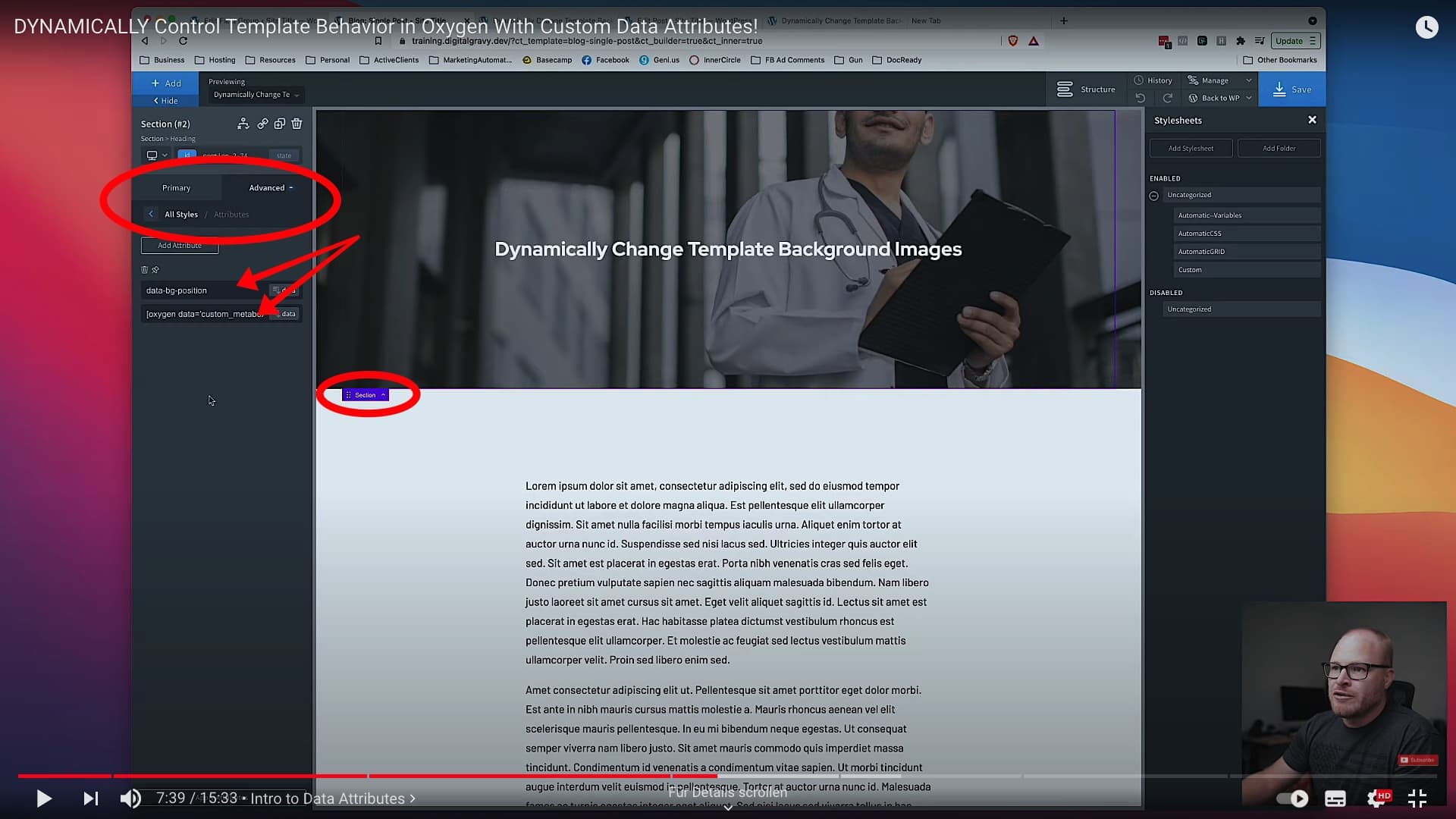
Im Template für die entsprechende SECTION unter Oxygen >> Advanced ein Data Attribut anlegen:
data-bg-position
Hero Background Position // VALUE aus den dynamischen Feldern von Metabox auswählen.
Paste this into a stylesheet in Oxygen:
/***
BACKGROUND IMAGE CONTROL FOR TEMPLATES
Control background position on template-generated pages.
***/

[data-bg-position="Left Top"] {
background-position: 20% 20%;
}

[data-bg-position="Left Center"] {
background-position: 20% 50%;
}

[data-bg-position="Left Bottom"] {
background-position: 20% 80%;
}

[data-bg-position="Center Top"] {
background-position: 50% 20%;
}

[data-bg-position="Center Center"] {
background-position: 50% 50%;
}

[data-bg-position="Center Bottom"] {
background-position: 50% 80%;
}

[data-bg-position="Right Top"] {
background-position: 80% 20%;
}

[data-bg-position="Right Center"] {
background-position: 80% 50%;
}

[data-bg-position="Right Bottom"] {
background-position: 80% 80%;
}