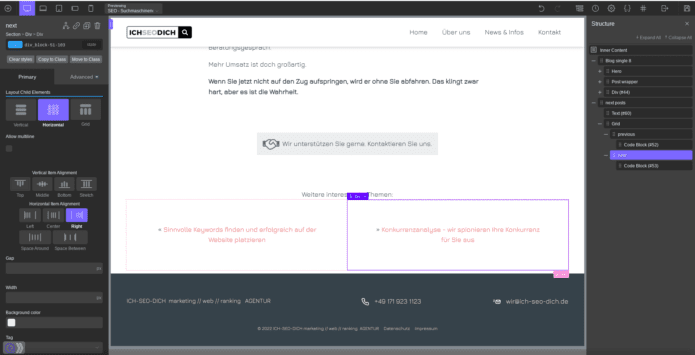
Step 1
Edit your Oxygen template for single blog posts.
Step 2
Add a Section where you want the previous and next post links to appear.
Add a Columns element with 50 50 column layout.
Add a Code Block element in the left column having:
<?php if ( get_previous_post_link() ) { previous_post_link( '%link', '%title', true, '', 'category' ); } ?>Add a Code Block element in the right column having:
<?php if ( get_next_post_link() ) { next_post_link( '%link', '%title', true, '', 'category' ); } ?>
Select the right column div and set Right horizontal item alignment.
Alternative mit Pfeilen
links & rechts
<?php
if ( get_previous_post_link() ) {
previous_post_link( '« %link', '%title', true, '', 'category' );
}
?>
<?php
if ( get_next_post_link() ) {
next_post_link( '%link »', '%title', true, '', 'category' );
}
?>