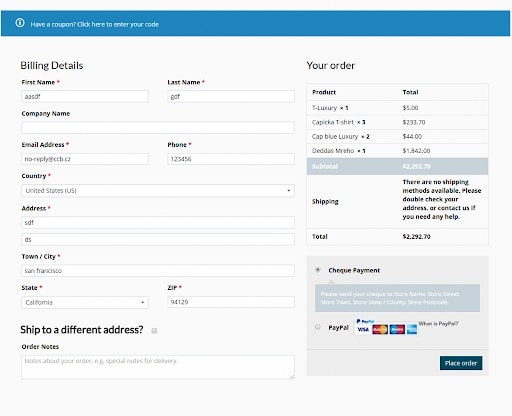
Today I will take a look at the Woocommerce Checkout page. What I want to do is make it two columns. Oxygen builder is displaying it as one column long page, which is not really user friendly for me. Let’s fix it with some custom CSS.
I will be using this CSS fix only for Desktop version with resolution bigger than 769px so I will use a media Query.
You will need to create custom Stylesheet in Oxygen (Go to some template edit with Oxygen > Manage > Stylesheets).
CSS FIX FOR TWO COLUMNS CHECKOUT
@media (min-width: 769px) {
    .oxy-woo-checkout .woocommerce .col2-set,
    .oxy-woo-checkout .woocommerce-page .col2-set {
        display: block;
    }
    .woocommerce.woocommerce-checkout form #customer_details.col2-set,
    .woocommerce-page.woocommerce-checkout form #customer_details.col2-set {
        width: 55%;
        float: left;
        margin-right: 4.347826087%;
    }
    .woocommerce.woocommerce-checkout form #customer_details.col2-set .col-1,
    .woocommerce.woocommerce-checkout form #customer_details.col2-set .col-2,
    .woocommerce-page.woocommerce-checkout form #customer_details.col2-set .col-1,
    .woocommerce-page.woocommerce-checkout form #customer_details.col2-set .col-2 {
        float: none;
        width: auto;
    }
    .woocommerce.woocommerce-checkout form #order_review,
    .woocommerce.woocommerce-checkout form #order_review_heading,
    .woocommerce-page.woocommerce-checkout form #order_review,
    .woocommerce-page.woocommerce-checkout form #order_review_heading {
        width: 40%;
        float: right;
        margin-right: 0;
        clear: right;
    }
}