optimization

Geschwindigkeit deiner Website optimieren

Wir alle kennen die Tools zum Messen der Geschwindigkeit einer Website: Pagespeed, YSlow, Pingdom, Webpagetest oder das Kombitool aus Pagespeed und YSlow GTMetrix. Aber wie wird zum Beispiel Browser Caching aktiviert? Wer sich damit nicht auskennt, der findet viele, viele Artikel dazu, die viel Code in sich haben und nichts erklären. Hier ist noch einer davon. 😉
Über die vergangenen Jahre habe ich dieses Gist immer wieder ergänzt, verbessert und korrigiert. Entstanden ist eine sehr praktische Sammlung von Einstellungen, die fail safe die jeweiligen Möglichkeiten des Hosters ausnutzen. Die entsprechenden Anweisungen sind in If-Abfragen gekapselt, so dass es bei guten Hostern keine Probleme mit nicht unterstützen Modulen geben sollte.

Die Einstellungen teilen sich in drei Bereiche: Komprimierung (Deflate/GZip), Browser Caching (Ablaufdatum für statische Caching-Inhalte definieren) und dem Setzen von sinnvollen Headern (Keep Alive, Accept Encoding, etc.).

#
# Sources:
# http://stackoverflow.com/questions/7704624/how-can-i-use-gzip-compression-for-css-and-js-files-on-my-websites
# http://codex.wordpress.org/Output_Compression
# http://www.perun.net/2009/06/06/wordpress-websites-beschleuinigen-4-ein-zwischenergebnis/#comment-61086
# http://www.smashingmagazine.com/smashing-book-1/performance-optimization-for-websites-part-2-of-2/
# http://gtmetrix.com/configure-entity-tags-etags.html
# http://de.slideshare.net/walterebert/die-htaccessrichtignutzenwchh2014
# http://de.slideshare.net/walterebert/mehr-performance-fr-wordpress
#
<IfModule mod_deflate.c>
# Insert filters / compress text, html, javascript, css, xml:
AddOutputFilterByType DEFLATE text/plain
AddOutputFilterByType DEFLATE text/html
AddOutputFilterByType DEFLATE text/xml
AddOutputFilterByType DEFLATE text/css
AddOutputFilterByType DEFLATE text/vtt 
AddOutputFilterByType DEFLATE text/x-component
AddOutputFilterByType DEFLATE application/xml
AddOutputFilterByType DEFLATE application/xhtml+xml
AddOutputFilterByType DEFLATE application/rss+xml
AddOutputFilterByType DEFLATE application/js
AddOutputFilterByType DEFLATE application/javascript
AddOutputFilterByType DEFLATE application/x-javascript
AddOutputFilterByType DEFLATE application/x-httpd-php
AddOutputFilterByType DEFLATE application/x-httpd-fastphp
AddOutputFilterByType DEFLATE application/atom+xml 
AddOutputFilterByType DEFLATE application/json
AddOutputFilterByType DEFLATE application/ld+json 
AddOutputFilterByType DEFLATE application/vnd.ms-fontobject 
AddOutputFilterByType DEFLATE application/x-font-ttf 
AddOutputFilterByType DEFLATE application/x-web-app-manifest+json 
AddOutputFilterByType DEFLATE font/opentype 
AddOutputFilterByType DEFLATE image/svg+xml
AddOutputFilterByType DEFLATE image/x-icon
# Exception: Images
SetEnvIfNoCase REQUEST_URI \.(?:gif|jpg|jpeg|png|svg)$ no-gzip dont-vary
# Drop problematic browsers
BrowserMatch ^Mozilla/4 gzip-only-text/html
BrowserMatch ^Mozilla/4\.0[678] no-gzip
BrowserMatch \bMSI[E] !no-gzip !gzip-only-text/html
# Make sure proxies don't deliver the wrong content
Header append Vary User-Agent env=!dont-vary
</IfModule>
## EXPIRES CACHING ##
<IfModule mod_expires.c>
ExpiresActive On
ExpiresDefault "access plus 1 week"
ExpiresByType image/jpg "access plus 1 year"
ExpiresByType image/jpeg "access plus 1 year"
ExpiresByType image/gif "access plus 1 year"
ExpiresByType image/png "access plus 1 year"
ExpiresByType image/svg+xml "access plus 1 month" 
ExpiresByType text/css "access plus 1 month"
ExpiresByType text/html "access plus 1 minute"
ExpiresByType text/plain "access plus 1 month"
ExpiresByType text/x-component "access plus 1 month" 
ExpiresByType text/javascript "access plus 1 month"
ExpiresByType text/x-javascript "access plus 1 month"
ExpiresByType application/pdf "access plus 1 month"
ExpiresByType application/javascript "access plus 1 months"
ExpiresByType application/x-javascript "access plus 1 months"
ExpiresByType application/x-shockwave-flash "access plus 1 month"
ExpiresByType image/x-icon "access plus 1 year"
ExpiresByType application/json "access plus 0 seconds"
ExpiresByType application/ld+json "access plus 0 seconds"
ExpiresByType application/xml "access plus 0 seconds"
ExpiresByType text/xml "access plus 0 seconds" 
ExpiresByType application/x-web-app-manifest+json "access plus 0 seconds" 
ExpiresByType text/cache-manifest "access plus 0 seconds" 
ExpiresByType audio/ogg "access plus 1 month" 
ExpiresByType video/mp4 "access plus 1 month" 
ExpiresByType video/ogg "access plus 1 month" 
ExpiresByType video/webm "access plus 1 month" 
ExpiresByType application/atom+xml "access plus 1 hour" 
ExpiresByType application/rss+xml "access plus 1 hour" 
ExpiresByType application/font-woff "access plus 1 month" 
ExpiresByType application/vnd.ms-fontobject "access plus 1 month" 
ExpiresByType application/x-font-ttf "access plus 1 month" 
ExpiresByType font/opentype "access plus 1 month" 
</IfModule>
## EXPIRES CACHING ##
#Alternative caching using Apache's "mod_headers", if it's installed.
#Caching of common files - ENABLED
<IfModule mod_headers.c>
<FilesMatch "\.(ico|pdf|flv|swf|js|css|gif|png|jpg|jpeg|txt|html|htm)$">
Header set Cache-Control "max-age=2592000, public"
</FilesMatch>
</IfModule>
<IfModule mod_headers.c>
 <FilesMatch "\.(js|css|xml|gz)$">
 Header append Vary Accept-Encoding
 </FilesMatch>
</IfModule>

<filesMatch "\\.(js|js.gz)$">
Header set Cache-Control "max-age=604800, private"
</filesMatch>
<IfModule mod_gzip.c>
 mod_gzip_on Yes
 mod_gzip_dechunk Yes
 mod_gzip_item_include file \.(html?|txt|css|js|php|pl)$
 mod_gzip_item_include handler ^cgi-script$
 mod_gzip_item_include mime ^text/.*
 mod_gzip_item_include mime ^application/x-javascript.*
 mod_gzip_item_exclude mime ^image/.*
 mod_gzip_item_exclude rspheader ^Content-Encoding:.*gzip.*
</IfModule>
# Set Keep Alive Header
<IfModule mod_headers.c>
 Header set Connection keep-alive
</IfModule>
# If your server don't support ETags deactivate with "None" (and remove header)
<IfModule mod_expires.c> 
 <IfModule mod_headers.c> 
 Header unset ETag 
 </IfModule> 
 FileETag None 
</IfModule>

SEO in Adobe Muse (Search Engine Optimization)

As an increasing number of great websites made with Adobe Muse pop up all over the web, occasionally I see designers missing one of the most critical factors in building and launching a successful website – SEO, which stands for search engine optimization.  For print designers new to the web, there are a few essential tasks that you must do in order to help search engines understand the structure of your website, and identify keywords that could yield a stream of search traffic.

1. Metadata

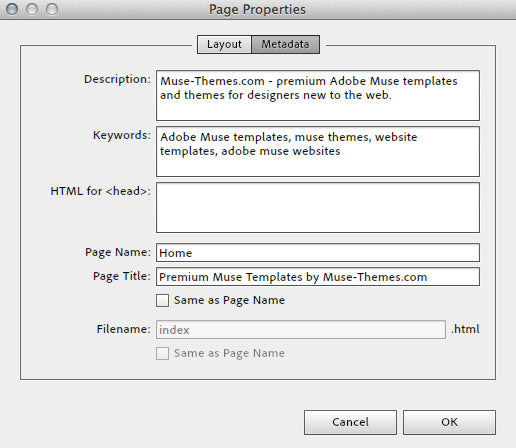
Within every Muse website, designers have the ability to input specific metadata that is unique to each page on the site.  This metadata includes the webpage title, description, and keywords, which are all important factors in how your site appears in search results.

Metadata in Adobe Muse

On a specific page of your Muse site, click PAGE > PAGE PROPERTIES > METADATA

Description: include a brief description of what your site is all about.  Try and use keywords that are relevant to your site’s content, and be sure to keep this description brief.  150-160 characters is said to be ideal, so keep it short and powerful.  Make sure your description accurately describes what is on the webpage – don’t try and trick Google by stuffing this full of keywords.

Keywords: this isn’t as essential as the meta description, however it’s still helpful to include relevant terms to your websites content.  Don’t bother piling this full of 1,000 keywords and phrases.  It won’t help your rankings.

Page Title: When editing the page title settings, be sure to uncheck “same as page name”.   The page name is what Adobe Muse will call your page within it’s site plan, as well as on the navigation bar. The page title however is what search engines will read, and what will display in the top of your browsers window.  Your page title should briefly describe the content of the page – users want information fast when browsing the web, so don’t try and make them read any more than they have to.

I can’t stress enough, the reason Google is a great search engine is because it truly gives you relevant, quality results for your search. If it was possible to trick it into displaying any average website, nobody would use Google because it returned garbage results.  Focus on making the site easier for users to navigate and understand, and the search engines will appreciate it.

2. Headings

Websites are built with a specific hierarchy of information, and search engines look for this structure to understand the content of your site.  You’re probably using descriptive titles and headings within your site (if not, you should be!) however unless you’ve mapped those headings to a “Headline Style” then your efforts will be significantly diminished.

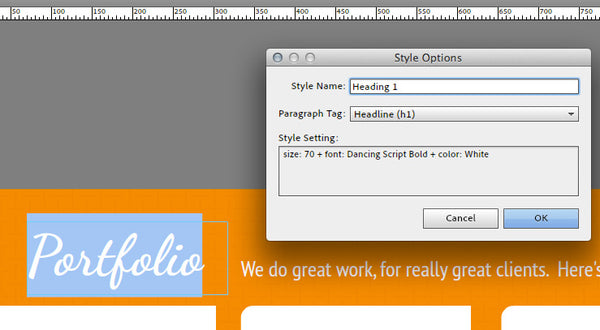
Heading 1 Tag Muse-Themes.com

Here’s how to set a proper heading style:

  • Create and style a new block of text, that contains your section heading (e.g. ABOUT US)
  • Highlight the text, and create a new paragraph style for the text.  Give it a name such as “Heading 1”
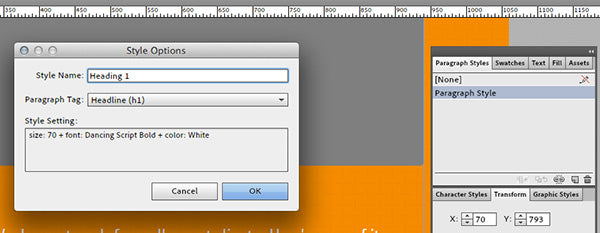
  • Within the style options dialog box, select the dropdown menu titled “Paragraph Tag” and choose an appropriate heading style to map it to.  In this example, we should pick Headline 1 (h1).

Style Options in Muse

The next time Muse outputs the code for your website, it will generate the proper HTML tags that let search engines know to reference this block of text as a true headline.


3. Alt Text and Image Titles

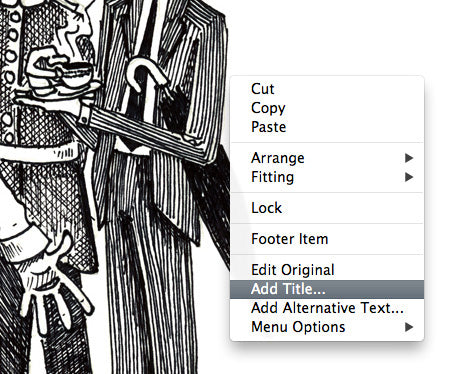
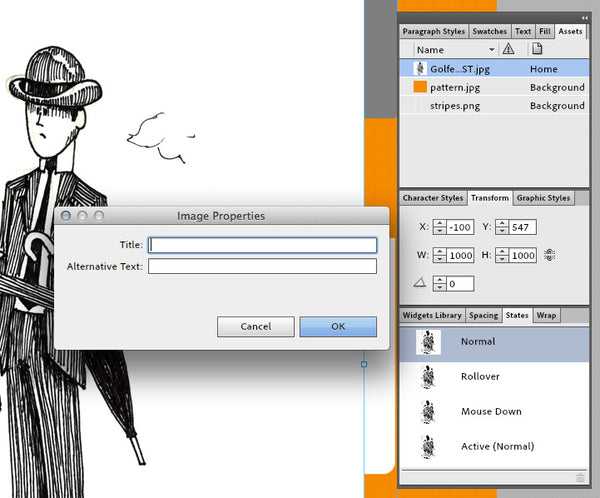
When placing images in Muse, you need to go one step further and assign a title and brief description of each image within the website.  After placing an image, right click (control-click) and select “Add Title”.  This brings up the image properties dialogue box, where you can provide some brief information about what the image is about.

Image Title: this is a straightforward description of the image.  It should follow the same guidelines as other titles – keep it brief, concise and accurate.  Most browsers will reveal this text if you hover over an image with your cursor.

Add Title to Images Muse SEO

Alt Text: the alt text is intended to help users who may not be able to see the image to understand what it is all about (perhaps due to a visual impairment).  While it’s not as essential as the headline tags or metadata, Google does crawl alt text and you should try and include it where possible.

Title Images - Muse-Themes.com


Image Optimization

One of the most important elements on your website are the images. Yet, search engines do not have eyes to analyze the images or categorize them for image search results. Therefore, you need to consider applying SEO techniques to optimize the graphic elements of the website.

While the image file name should be descriptive, the Alt tag and Tooltip are also important bits of information to add to the images. The Alt tag lets you add a description of the image in a few words, so the search engine crawlers can understand and categorize the image based on the Alt information.

The Tooltip is a small text that appears when the site visitors roll over the image. This tip is important from the usability side which affects the general optimization of the website.

You can add the Alt and Tooltip in Adobe Muse by following these steps:

  1. Select the image from the layout
  2. Go to the Assets panel, right click the image and choose Image Properties
  3. Add the Alt and Tooltip text in the dialog box and click OK


4. Real text vs. images

In order for search engines to crawl your site and „read“ the written content, you need to make sure that you’re using as much real text (rather than images) as possible.  This might seem obvious for body copy, however with the addition of Typekit and web fonts within Adobe Muse, there is no reason why headings, navigation bars, and block quotes can’t also be styled using HTML text.

An easy way to test whether or not a search engine can crawl the text on your site is by trying to highlight and copy it into another document.  Images won’t let you select a specific word or letter (you can only save the entire image).  This was one of the early limitations in websites built entirely in Flash – text was enclosed inside a flash movie, and search spiders could not read any of the written content.

With the latest advancements in HTML / CSS and Adobe Muse, there’s almost nothing that you could do to an image button that you can’t do to a real text button.

Web Fonts, Web Safe Fonts or System Fonts?

There are 3 options for working with text in Adobe Muse. When it comes to Search Engine Optimization it’s best to use web fonts or web safe fonts. Here’s why:

Web Safe Fonts: Prior to the creation of services like Adobe Typekit, web designers were limited to using only the fonts that came preinstalled with a user’s specific operating system. These fonts had to be common between old and new versions of both Windows and Mac, leaving designers with only 5-10 good options for type. If you needed to use a specific typeface that wasn’t included with the OS (perhaps to meet corporate brand guidelines) your only option was to create an image from the text, and place that in your website. This violates the SEO best practice of using real text outlined above, and increases bandwidth use due to the image download.

The “web safe fonts” listed in Adobe Muse are the fonts that are commonly installed with modern operating systems.

Sticking with the limited web-safe list above will certainly test your creativity!

Web Fonts: Web fonts are a fairly recent development in web design, and they have given designers the ability to use custom or commercial fonts on websites without worrying about whether the visitor has it installed on their system. The use of web fonts can be achieved in a variety of ways (typically using CSS or Javascript) however the most popular method is through font subscription services such as Typekit. Web font service companies store these fonts on their own servers and your website will automatically access and download the font, which has been optimized for on screen display.

The “Web Fonts” listed in Adobe Muse are a collection of over 400 typefaces – they look great in all modern browsers, and are easily read by search engines.

Webfonts available directly in Adobe Muse – a really powerful feature!

System Fonts (exports as image): These are the fonts that a user has installed on their computer, and may not be common among all visitors to your website. When using a system font within Adobe Muse, the text will be automatically rasterized and converted to an image format when published. This means it cannot be indexed by search engines, and will increase website load times due to the file size of the image. The use of text images is often avoided in modern web design (due to the SEO & accessibility limitations), however there is still occasionally a use for it within certain applications (elaborate buttons perhaps).

For more information on Font options available in Muse, visit the following Adobe website:
http://www.adobe.com/products/muse/font-types.html

***

At the end of the day, having good quality relevant content will likely be the most essential factor in your search engine rankings. Write content with important keywords in mind, and keep your site current (update it regularly!).  SEO is a vast subject, and there a variety of tips and tactics that you can use to improve your rankings, however if you follow the tips above you should see a huge impact in your Muse websites rankings.

Always remember that Google’s job is to find the truth, and if you want your site to reach the top spot for a particular keyword, then you need to make sure it actually deserves to be there. 

Search Engine Optimization SEO Guide

Google hat bestätigt, dass es ungefähr 200 Rankingsignale in seinem Algorithmus nutzt. Jedoch hat der Suchmaschinenanbieter nie alle Faktoren veröffentlicht.

Diese Auflistung ist keinesfalls offizieller Natur. Sie fasst jedoch die besten verfügbaren Informationen zusammen, wie Google Seiten und Webseiten rankt. Achten Sie auf diese Faktoren um Ihr Google Ranking zu verbessern!

A . Domain-Faktoren

1. Alter der Domain


Der Unterschied zwischen einer 6 Monate alten Domain gegenüber einer 1 Jahr alten Domain ist wirklich gar nicht so groß. In anderen Worten, das Alter der Domain nutzt … aber es ist nicht sehr wichtig.

2. Keyword erscheint in der Top-Level-Domain

Bringt nicht die Steigerung wie bisher, aber ihr Keyword in der Domain agiert immer noch als relevantes Signal. Schließlich hebt Google Keywords, die im Domainnamen erscheinen, immer noch fett hervor.

Keyword_in_Top_Level_Domain

3. Keyword als erstes Wort in der Domain

Die Teilnehmer der SEOMoz-Umfrage 2011 zu den Suchmaschinen-Rankingfaktoren stimmten darin überein, dass eine Domain, die mit ihrem Ziel-Keyword beginnt, besser ist als Seiten, die entweder das Keyword nicht in ihrer Domain oder in der Mitte oder am Ende ihrer Domain haben:

Das Keyword ist das erste Wort im Stamm-Domainnamen – 69,3 %

Keyword_in_Top_Level_Domain_Anfang

4. Dauer der Domainregistrierung

Ein Google-Patent besagt:

„Wertvolle (legitime) Domains werden häufig für viele Jahre im Voraus bezahlt, während Zugangsdomains (nicht legitime) selten länger als ein Jahr verwendet werden. Daher kann das zukünftige Ablaufdatum einer Domain als Faktor genutzt werden, die Legitimität einer Domain vorherzusagen“.

5. Keyword im Subdomainnamen

Die SEOMoz-Teilnehmer stimmten auch darin überein, dass ein in der Subdomain vorkommendes Keyword das Ranking erhöht.

Das Keyword ist der Subdomainname – 52,8 %

6. Historie der Domain

Eine Seite mit häufigen Inhaberwechseln (per Whois) oder mehreren Einbrüchen kann Google dazu veranlassen, die Historie der Seite zu löschen und dabei Links ungültig zu machen, die auf die Seite verweisen.

7. Exact Match Domain (EMD)

EMDs können Ihnen immer noch einen Vorteil verschaffen … wenn es sich um eine qualitative Seite handelt. Aber wenn die EMD eine qualitativ minderwertige Seite ist, ist sie für das EMD-Update anfällig.

Exact Match Domain

Matt Cutts erklärt:

„Kleiner Wetterbericht: Die kleine kommende Google-Algorithmus-Änderung wird EMDs mit minderwertigem Inhalt in Suchresultaten reduzieren.“

8. Abgestrafte Whois-Inhaber

Wenn Google eine bestimmte Person als Spammer identifiziert, machte es Sinn, dass es andere Seiten dieser Person überprüft.

Lassen Sie Satelliten-Seiten, etc von Verwandten und Bekannten registrieren oder holen Sie sich deren Erlaubnis.x

9. Öffentliches kontra privates Whois

Private Whois-Informationen können ein Zeichen dafür sein, dass man etwas zu verbergen hat. Matt Cutts erklärte bei der Pubcon 2006 Folgendes:

„… Als ich ihre Whois-Daten überprüfte, waren diese alle durch den „Whois Privacy Protection Service“ geschützt. Dies ist relativ unüblich. …. Whois Privacy zu aktivieren ist nicht automatisch schlecht, aber wenn einmal mehrere dieser Faktoren zusammenkommen, sprechen Sie oft von einem anderen Typ Webmaster als dem, der nur eine einzige Seite oder so hat.

10. Länderspezifische TLD-Erweiterung

Eine Ländercode-Top-Level-Domain (.cn, .pt, .ca) zu haben, hilft beim Ranking der Seite für ein bestimmtes Land … aber begrenzt die Möglichkeiten im globalen Ranking.

Sofern Ihr Shop/Webseite mehrsprachig ist, versuchen Sie für jede Sprache die entsprechende Top Level Domain zu nutzen. Bitte erzeugen Sie hierbei aber keinen doppelten Content.x


B. Page-Level-Faktoren

11. Keyword im Title-Tag

Der Title-Tag ist der zweitwichtigste Teil des Contents einer Webseite (neben dem Content der Seite) und gilt daher ein starkes Relevanzsignal.

Keyword_im_Title

12. Keyword im Description-Tag

Dabei handelt es sich um ein anderes wichtiges Relevanzsignal mit dem Sie Ihr Google Ranking verbessern können.

Keyword_in_Meta_Description

13. Keyword erscheint im H1-Tag

H1-Tags sind ein „zweiter Title-Tag“, die laut den Ergebnissen dieser Korrelationsstudie ein weiteres Relevanzsignal an Google senden.

Hier das Ergebnis der Studie:

14. Title-Tag beginnt mit dem Keyword

Laut den SEOMoz-Daten neigen Title-Tages, die mit einem Keyword beginnen, dazu, besser abzuschneiden als Title-Tags, bei denen das Keyword am Ende des Tags steht.

15. Keyword ist der meistgenutzte Ausdruck in einem Dokument

Ein Keyword öfter als alle anderen zu platzieren, dürfte als Relevanzsignal dienen. Achten Sie weiter unten beschrieben jedoch auf die entsprechende Keyword-Dichte!

Verwenden Sie zudem Synonyme und Ihr Keyword in anderen Kombinationen auf Ihrer Seite.

16. Länge des Contents

Content mit mehr Wörtern kann ein größeres Spektrum abdecken und wird kurzen oberflächlichen Artikeln normalerweise vorgezogen. Microsite Masters hat herausgefunden, dass die Länge des Contents mit SERP-Positionen korreliert.

Sie sehen dieses Beispiel auch auf der Seite von Zalando.de: Alle wichtigen Seiten haben über 2.000 Wörter Text. Dieser befindet sich in der Sidebar und unter den Produkt-Bildern.

17. Keyword-Dichte

Obwohl nicht mehr so wichtig, wie es früher einmal war, ist die Keyword-Dichte immer noch etwas, was Google nutzt, um das Thema einer Webseite zu bestimmen.

Übertreiben Sie die Keyword-Dichte nicht. Packen Sie das Keyword nicht zu häufig in Ihren Text. Google erkennt dies als Keyword Stuffing.x

18. Latent Semantic Indexing Keywords im Content (LSI)

LSI-Keywords (Latent Semantic Indexing Keywords) helfen den Suchmaschinen, den Sinn von Wörtern mit mehr als einer Bedeutung zu extrahieren (Apple als Computerfirma gegenüber der Frucht). Das Vorhandensein/Fehlen von LSI agiert wahrscheinlich auch als Qualitätssignal für den Content.

19. LSI-Keywords in Title- und Description-Tags

Wie schon beim Content von Webseiten helfen LSI-Keywords in Meta-Tags von Seiten wahrscheinlich Google zwischen Synonymen zu unterscheiden. Diese können dann auch als Relevanzsignal agieren.

20. Seitenladegeschwindigkeit mit HTML

Google und Bing nutzen die Seitenladegeschwindigkeit als Rankingfaktor. Suchmaschinen-Spinnen können Ihre Seitengeschwindigkeit auf Grund des Seitencodes und der Dateigröße ziemlich genau schätzen.

Sie können die Ladegeschwindigkeit mit diesen Tools messen. Zudem erhalten Sie Tipps, wie Sie Ihre Seite anschließend verbessern:

Googles Pagespeed

Yslow

21. Doppelter Content

Identischer Content auf der gleichen Seite (sogar leicht abgeändert) kann die Suchmaschinenpräsenz einer Seite negativ beeinflussen.

Sofern Sie mehrere ähnliche Kategorien (rote Schuhe, blaue Schuhe, grüne Schuhe, etc) dennoch mit viel Text versehen möchten, sollten Sie Text Spinning in Erwägung ziehen. Dieses spart Geld und liefert dennoch gute Ergebnisse.

22. rel=“canoncial“

Richtig genutzt kann der Gebrauch dieses Tags Google davon abhalten, den doppelten Inhalt von Seiten zu beachten.

Verwenden Sie das Canonical Tag vor allem auf Seiten, die mit php-Paramtern ein anderes Ergebnis ergeben. Ein Beispiel wären Seiten, die durch Anhängung von “?filter=rot” nur alle roten Produkte anzeigen.x

23. Seitenladegeschwindigkeit mit Chrome

Google kann auch Chrome-Nutzerdaten verwenden, um die Ladegeschwindigkeit einer Seite besser einzuschätzen, da dies die Servergeschwindigkeit, CDN-Nutzung und andere nicht HTML-relevante Seitengeschwindigkeitssignale berücksichtigt.

24. Bildoptimierung

On-Page-Bilder senden Suchmaschinen mittels ihres Dateinamens, Alt-Textes, Titels, ihrer Beschreibung und Bildunterschrift wichtige Relevanzsignale.

25. Aktualität von Content-Updates

Das Google Caffeine Update bevorzugt kürzlich upgedateten Content, vor allem für zeitkritische Suchen. Um die Bedeutung dieses Faktors hervorzuheben, zeigt Google bei bestimmten Seiten das Datum des letzten Updates einer Seite.

26. Ausmaß von Content-Updates

Die Bedeutung von Bearbeitungen und Änderungen ist auch ein Aktualitätsfaktor. Ganze Abschnitte hinzuzufügen oder zu löschen, ist ein wesentlich größeres Update als die Reihenfolgen von einigen Wörtern abzuändern.

Schauen Sie also, dass Sie ältere Blog-Beiträge immer mal wieder updaten und durch neue Informationen ergänzen.

27. Historische Updates

Seiten-Updates: Wie oft wurde die Webseite im Laufe der Zeit upgedated? Täglich, wöchentlich? Die Häufigkeit von Seiten-Updates spielt auch für die Aktualität eine Rolle.

28. Keyword-Bedeutung

Ein Keyword, das in den ersten 100 Wörtern des Contents einer Seite erscheint, scheint ein bedeutendes Relevanzsignal zu sein.

29. Keyword in H2-, H3-Tags

Ein Keyword, das als Untertitel im H2- oder H3-Format erscheint, kann ein weiteres schwaches Relevanzsignal darstellen. Die SioMoz-Teilnehmer stimmen überein:

Keyword ist im H2-Tag der Seite vorhanden – 47,2 %

30. Keyword-Wortfolge

Eine exakte Übereinstimmung eines Suchkeywords im Content einer Seite wird gewöhnlich besser ranken, als die gleiche Keyword-Phrase in einer anderen Reihenfolge.

Zum Beispiel: Betrachten Sie die Suche nach „Katzenrasurtechniken“. Eine Seite, die für die Phrase „Katzenrasurtechniken“ optimiert wurde, wird besser ranken als eine Seite, die für „Techniken für die Katzenrasur“ optimiert wurde.

31. Outbound-Link-Qualität

Viele SEOs sind der Meinung, dass das Linking auf Autoritätsseiten dabei hilft, Vertrauenssignale an Google zu senden.

32. Outbound-Link-Thema

Laut SEOMoz können Suchmaschinen den Content der Seiten, auf die Sie verlinken, als Relevanzsignal nutzen. Wenn Sie zum Beispiel eine Seite über Autos haben, die auf filmbezogene Seiten verlinkt ist, kann dies Google sagen, dass es sich bei Ihrer Seite um Filmautos, nicht um das Auto an sich handelt.

33. Grammatik und Rechtschreibung

Richtige Grammatik und Rechtschreibung sind ein Qualitätssignal, obwohlCutts 2011 unterschiedliche Aussagen darüber traf, ob dies wichtig sei oder nicht.

34. Syndizierter Content

Wenn der Content auf der Seite original? Wenn er von einer indexierten Seite entnommen oder kopiert ist, wird er nicht so gut wie das Original ranken oder in Googles Supplemental Index landen.

35. Hilfreicher ergänzender Content

Laut den durchgesickerten Google Rater Guidelines gilt ein hilfreicher ergänzender Content als Qualitätsindikator einer Seite. Beispiele beinhalten Währungsrechner, Kreditzinsrechner und interaktive Rezepte.

Aber auch Bilder und Videos sind ein wichtiger Faktor für Suchmaschinen und Benutzer, da Sie dazu beitragen die Usability zu verbessern.

36. Anzahl an Outbound-Links

Zu viele DoFollow-OBLs können ein „Abfließen“ des PageRanks verursachen, was der Suchpräsenz schaden kann.

Allerdings genießen sogenannte Hub-Pages ein hohes Ansehen bei Google. Hier handelt es sich um Seiten, die die besten Seiten im Netz zu einem Thema sammeln und mit wertvollem Content anreichern.

37. Multimedia

Bilder, Videos und andere Multimedia-Elemente können als Qualitätssignal für den Content agieren.

38. Anzahl an internen Links auf eine Seite

Die Anzahl an internen Links auf eine Seite verweist auf ihre Bedeutung im Hinblick auf andere Seiten der Webseite.

39. Qualität von internen Links auf eine Seite

Interne Links von maßgeblichen Seiten auf einer Domain haben eine stärkere Wirkung als Links von Seiten mit keiner oder geringer PR.

40. Defekte Links

Zu viele defekte Links auf einer Seite können ein Zeichen für eine vernachlässigte oder verlassene Seite sein. Die Google Rater Guidelines nutzen defekte Links als einen Weg, um die Qualität einer Homepage zu bewerten.

41. Affiliate-Links

Affiliate-Links selbst werden Ihren Rankings wahrscheinlich nicht schaden. Aber wenn Sie zu viele haben, kann Googles Algorithmus verstärkt auf andere Qualitätssignale achten, um sicherzugehen, dass Sie keine „Thin-Affiliate-Seite“ sind.

42. Leselevel

Es gibt keinen Zweifel, dass Google das Leselevel von Webseiten einschätzt:

Ergebnis nach Leselevel für Leselevel:

  • Einfach: 33 %
  • Mittel: 59 %
  • Fortgeschritten: 8 %

Aber was Google mit dieser Information macht, steht zur Debatte. Einige SEOs sind der Meinung, dass ein einfaches Leselevel Ihrer Seite helfen wird zu ranken, weil es die Masse ansprechen wird. Jedoch hat Linchpin SEO entdeckt, dass das Leselevel ein Faktor ist, der Qualitätsseiten von Content-Farmen trennt.

43. HTML-Fehler/WC3-Validierung

Viele HTML-Fehler oder eine schlampige Codierung können ein Signal für eine qualitativ minderwertige Seite sein. Obgleich umstritten, denken viele SEOs, dass die WC3-Validierung ein schwaches Qualitätssignal sei.

Hier können Sie Ihre Webseite überprüfen: Webseite auf W3C-Validierung überprüfen

44. Domain-Autorität des Seitenhosts

Alle Dinge, die einer Seite auf einer maßgebenden Domain gleichgeordnet sind, sind einer Seite auf einer Domain mit weniger Autorität übergeordnet.

45. Seiten PageRank

Nicht perfekt korreliert, aber im Allgemeinen neigen Seiten mit höherem PR dazu, besser zu ranken als Seiten mit niedrigem PR.

46. Länge der URL

Das Search Engine Journal stellt fest, dass übertrieben lange URLs der Suchpräsenz schaden können.

47. URL-Pfad

Eine Seite, die der Homepage näher ist, kann einen leichten Autoritätsboost erhalten.

48. Menschliche Editoren

Obwohl nie bestätigt, hat Google ein Patent für ein System angemeldet, das menschlichen Editoren ermöglicht, die SERPs zu beeinflussen.

49. Seitenkategorie

Die Kategorie, unter der die Seite erscheint, ist ein Relevanzsignal. Eine Seite, die Teil einer eng miteinander verwandten Kategorie ist, soll einen Relevanzboost erhalten, im Vergleich zu einer Seite, die einer nicht verwandten oder weniger verwandten Kategorie zugeordnet ist.

50. WordPress-Tags

Tags sind ein WordPress-spezifische Relevanzsignal. Gemäß Yoast.com:

„Der einzige Weg Ihr SEO zu verbessern ist, einen Teil des Contents mit einem anderen zu verknüpfen, und insbesondere eine Gruppe von Beiträgen miteinander.“

51. Keyword in der URL

Ein anderes wichtiges Relevanzsignal.

52. URL-String

Die Kategorien im URL-String werden von Google gelesen und können ein thematisches Signal liefern, wovon die Seite handelt:

URL_String

53. Referenzen und Quellen

Referenzen und Quellen zu zitieren, wie Forschungspapiere es tun, kann ein Qualitätssignal sein. Die Google Quality Guidelines erklären, dass Kritiker Ausschau nach Quellen halten sollen, wenn sie bestimmte Seiten betrachten:

„Dies ist ein Thema, bei dem Expertise und maßgebende Quellen wichtig sind …“

54. Aufzählungs- und Nummerierungslisten

Aufzählungs- und Nummerierungslisten helfen, Ihren Content für Leser aufzubrechen, um ihn nutzerfreundlicher zu machen. Google stimmt vermutlich zu und dürfte Content mit Aufzählungen und Nummerierungen bevorzugen.

55. Priorität einer Seite in der Sitemap

Die Priorität, die einer Seite durch die sitemap.xml-Datei eingeräumt wird, kann das Ranking beeinflussen.

Hier erfahren Sie, wie Sie Ihre Sitemap bauen können.

56. Zu viele Outbound-Links

Direkt vom oben genannten durchgesickerten Dokument:

„Einige Seiten haben viel zu viele Links, die die Seite verdecken und vom Haupt-Content ablenken“

57. Quantität anderer Keywords, mit denen die Seite rankt

Wenn die Seite mit mehreren anderen Keywords rankt, kann dies für Google ein internes Qualitätssignal darstellen.

58. Alter der Seite

Obwohl Google frischen Content bevorzugt, kann eine ältere Seite, die regelmäßig upgedated wird, eine neuere Seite übertreffen.

59. Nutzerfreundliches Layout

Dazu passt ein Zitat aus den Google Quality Guidelines:

„Das Seitenlayout von besonders qualitativen Seiten macht den Hauptcontent sofort sichtbar“

60. Geparkte Domains

Ein Google Update im Dezember 2011 verringerte die Suchpräsenz von geparkten Domains.


Planning Strategies

  1. Finding profitable keyword phrases
  2. Choosing a professional domain name

On Page Optimizations

  1. Search engine friendly page names
  2. Making an easy to follow navigation menu
  3. Creating content search engines love
  4. Targeting specific geo-locations for better rankings
  5. Optimizing image file names for universal search
  6. How keywords in links can boost your search engine rankings
  7. Footer keywords for better navigation
  8. If You Use SEIntelligence
  9. Title tags, the most important optimization technique
  10. Meta keywords and how to use them
  11. Adding a captive description
  12. Header tags for additional classification
  13. Alternative text for images
  14. Splash screens and how they hurt your website

Off Page Optimizations

  1. How to properly get listed in search engines with XML sitemaps
  2. Know your website visitors with Analytics
  3. NEW: How your site speed effects your search engine rankings
  4. Popularity contest: How your site popularity effects your rankings
  5. Track your overall success with search engines
  6. Exploring the social web and bookmarking
  7. Get right to the top of Google with Google Places
  8. Get instant visitors with directory listings
  9. Write about your expertise to build your site credibility
  10. Announcing your website to the world with Press Releases
  11. Let users discover your products with Google Product Search

For SEIntelligence Users

  1. An Introduction To SEIntelligence – Loading Your Website
  2. Familiarizing Yourself With The On-Page Optimizations Windows
  3. Getting Ready To Do On-Page Optimizations – Adding Meta Keywords
  4. Title Tags, The Most Important Optimization Technique
  5. Page Descriptions – Let’s Be Convincing!
  6. Meta Tags – Giving Search Engines A Bit More Information
  7. Creating High Quality Header Tags
  8. The Proper Way To Link Internally

Social Media Marketing

  1. Create A Custom Facebook Fan Page For Your Business
  2. Easy Way To Increase Mailing List Sign Ups By 300%
  3. How To Use Pinterest to Get More Visitors to Your Website


http://www.ragesw.com/videos/seo-video.html