

Welche Festplatten halten am längsten?
Zugegeben, die Überschrift kommt etwas reißerisch rüber. Trotzdem ranken sich immer wieder Gerüchte über die Lebensdauer von Festplatten der verschiedenen Hersteller. Ich kann mich noch an Zeiten erinnern, als nach landläufiger Meinung Seagate die beste Wahl war, während man um Western Digital einen großen Bogen machen möge. Der Dienst für Online-Backup Backblaze hat nun in einem Blogpost ein paar Statistiken zu ihren verwendeten Festplatten veröffentlicht, inklusive aller bisherigen Ausfälle und durchschnittlicher Lebensdauer der Festplatten für die einzelnen Hersteller und Modelle.
Welche Festplatten kommen zum Einsatz?
In die Statistik eingeflossen sind insgesamt 27.134 Festplatten der Hersteller Hitachi, Seagate und Western Digital. Das Unternehmen hat auch ein paar Festplatten von Toshiba und Samsung im Einsatz, jedoch nicht genug für eine halbwegs aussagekräftige Auswertung.
Für den Kauf von Festplatten ist bei Backblaze der Kostenfaktor sehr entscheidend. Sieht eine Produktion vielversprechend aus und ist die Festplatte zudem günstig, werden ein paar dieser Festplatten von Backblaze intern getestet und dann für einige Wochen in der Produktivumgebung eingesetzt. Können die Festplatten überzeugen, kommen sie auf die Einkaufsliste.
Bei allen Festplatten handelt es sich darüber hinaus um Verbraucherprodukte, also keine speziellen Produkte für Serverumgebungen oder dergleichen. Für Qualität ist man bereit etwas mehr auszugeben, da auch der Wechsel von Festplatten Zeit und Geld beansprucht.
Jährliche Fehlerrate
Die jährliche Fehlerrate geht aus der durchschnittlichen Anzahl von Ausfällen einer Festplatte innerhalb eines Jahres hervor.

Die Grafik zeigt recht deutlich, welche Festplatten welcher Hersteller hier nicht unbedingt gut abschneiden. Im Bereich 1,5 TB weist beispielsweise das Modell Seagate Barracuda LP (ST31500541AS) bei 1929 verwendeten Modellen und einem Durchschnittsalter von 3,8 Jahren eine Fehlerrate von 9,9% auf. Beim Modell Seagate Barracuda 7200(ST31500341AS) lag die Fehlerrate bei 539 Festplatten in Verwendung und einem Durchschnittsalter von 3,8 Jahren sogar bei 25,4%.
Im Bereich von 3 TB liegt beispielsweise das Modell Seagate Barracuda (ST3000DM001) bei einem Durchschnittsalter von 1,4 Jahren bei einer Fehlerrate von 9,8%, während das Modell Hitachi GST Deskstar 5K3000 (HDS5C3030ALA630) bei einem Durchschnittsalter von 1,7 Jahren nur bei 0,9% liegt.
Im Artikel werden alle vorhandenen Festplatten statistisch miteinander verglichen. Gegenübergestellt werden außerdem die verschiedenen Modelle der Hersteller untereinander.
3 Jahre später – Lebensdauer der Festplatten
Eine andere Grafik zeigt die Situation während einer Zeitspanne von 36 Monaten bezüglich der Hersteller. Während einige Festplatten von Western Digital hier schon in den ersten Monaten ausfielen, arbeiteten die anderen von ihnen relativ stabil für den Rest der 36 Monate weiter. Hitachi kann einen fast konstant guten Wert vorweisen, während bei den Festplatten von Seagate eine eher niedrige Überlebensrate zu verzeichnen ist.
Statistisch liegt Hitachi mit einer Überlebensrate nach 3 Jahren mit 96,9% an erster Stelle, gefolgt von Western Digital mit 94,8% und Seagate mit 73,5%.
Insgesamt kann man trotzdem sagen, dass eine sehr beträchtliche Anzahl aller Festplatten auch nach 3 Jahren noch aktiv ist und ohne Probleme ihre Arbeit verrichtet.
My last two blog posts were about expected drive lifetimes and drive reliability. These posts were an outgrowth of the careful work that we’ve done at Backblaze to find the most cost-effective disk drives. Running a truly unlimited online backup service for only $5 per month means our cloud storage needs to be very efficient and we need to quickly figure out which drives work.
Because Backblaze has a history of openness, many readers expected more details in my previous posts. They asked what drive models work best and which last the longest. Given our experience with over 25,000 drives, they asked which ones are good enough that we would buy them again. In this post, I’ll answer those questions.
Drive Population
At the end of 2013, we had 27,134 consumer-grade drives spinning in Backblaze Storage Pods. The breakdown by brand looks like this:
| Hard Drives by Manufacturer Used by Backblaze | |||
| Brand | Number of Drives | Terabytes | Average Age in Years |
|---|---|---|---|
| Seagate | 12,765 | 39,576 | 1.4 |
| Hitachi | 12,956 | 36,078 | 2.0 |
| Western Digital | 2,838 | 2,581 | 2.5 |
| Toshiba | 58 | 174 | 0.7 |
| Samsung | 18 | 18 | 3.7 |
As you can see, they are mostly Seagate and Hitachi drives, with a good number of Western Digital thrown in. We don’t have enough Toshiba or Samsung drives for good statistical results.
Why do we have the drives we have? Basically, we buy the least expensive drives that will work. When a new drive comes on the market that looks like it would work, and the price is good, we test a pod full and see how they perform. The new drives go through initial setup tests, a stress test, and then a couple weeks in production. (A couple of weeks is enough to fill the pod with data.) If things still look good, that drive goes on the buy list. When the price is right, we buy it.
We are willing to spend a little bit more on drives that are reliable, because it costs money to replace a drive. We are not willing to spend a lot more, though.
Excluded Drives
Some drives just don’t work in the Backblaze environment. We have not included them in this study. It wouldn’t be fair to call a drive “bad” if it’s just not suited for the environment it’s put into.
We have some of these drives running in storage pods, but are in the process of replacing them because they aren’t reliable enough. When one drive goes bad, it takes a lot of work to get the RAID back on-line if the whole RAID is made up of unreliable drives. It’s just not worth the trouble.
The drives that just don’t work in our environment are Western Digital Green 3TB drives and Seagate LP (low power) 2TB drives. Both of these drives start accumulating errors as soon as they are put into production. We think this is related to vibration. The drives do somewhat better in the new low-vibration Backblaze Storage Pod, but still not well enough.
These drives are designed to be energy-efficient, and spin down aggressively when not in use. In the Backblaze environment, they spin down frequently, and then spin right back up. We think that this causes a lot of wear on the drive.
Failure Rates
We measure drive reliability by looking at the annual failure rate, which is the average number of failures you can expect running one drive for a year. A failure is when we have to replace a drive in a pod.
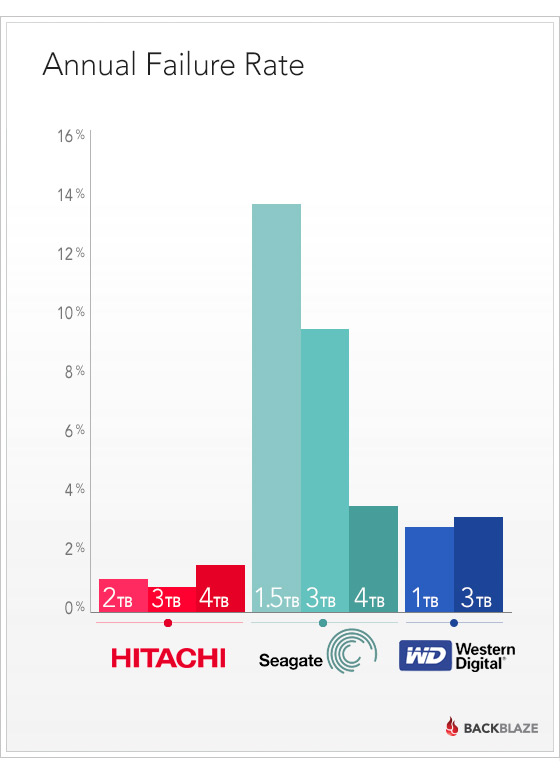
This chart has some more details that don’t show up in the pretty chart, including the number of drives of each model that we have, and how old the drives are:
| Number of Hard Drives by Model at Backblaze | ||||
| Model | Size | Number of Drives | Average Age in Years | Annual Failure Rate |
|---|---|---|---|---|
| Seagate Desktop HDD.15 (ST4000DM000) | 4.0TB | 5199 | 0.3 | 3.8% |
| Hitachi GST Deskstar 7K2000 (HDS722020ALA330) | 2.0TB | 4716 | 2.9 | 1.1% |
| Hitachi GST Deskstar 5K3000 (HDS5C3030ALA630) | 3.0TB | 4592 | 1.7 | 0.9% |
| Seagate Barracuda (ST3000DM001) | 3.0TB | 4252 | 1.4 | 9.8% |
| Hitachi Deskstar 5K4000 (HDS5C4040ALE630) | 4.0TB | 2587 | 0.8 | 1.5% |
| Seagate Barracuda LP (ST31500541AS) | 1.5TB | 1929 | 3.8 | 9.9% |
| Hitachi Deskstar 7K3000 (HDS723030ALA640) | 3.0TB | 1027 | 2.1 | 0.9% |
| Seagate Barracuda 7200 (ST31500341AS) | 1.5TB | 539 | 3.8 | 25.4% |
| Western Digital Green (WD10EADS) | 1.0TB | 474 | 4.4 | 3.6% |
| Western Digital Red (WD30EFRX) | 3.0TB | 346 | 0.5 | 3.2% |
| Seagate Barracuda XT (ST33000651AS) | 3.0TB | 293 | 2.0 | 7.3% |
| Seagate Barracuda LP (ST32000542AS) | 2.0TB | 288 | 2.0 | 7.2% |
| Seagate Barracuda XT (ST4000DX000) | 4.0TB | 179 | 0.7 | n/a |
| Western Digital Green (WD10EACS) | 1.0TB | 84 | 5.0 | n/a |
| Seagate Barracuda Green (ST1500DL003) | 1.5TB | 51 | 0.8 | 120.0% |
The following sections focus on different aspects of these results.
1.5TB Seagate Drives
The Backblaze team has been happy with Seagate Barracuda LP 1.5TB drives. We’ve been running them for a long time – their average age is pushing 4 years. Their overall failure rate isn’t great, but it’s not terrible either.
The non-LP 7200 RPM drives have been consistently unreliable. Their failure rate is high, especially as they’re getting older.
| 1.5 TB Seagate Drives Used by Backblaze | ||||
| Model | Size | Number of Drives | Average Age in Years | Annual Failure Rate |
|---|---|---|---|---|
| Seagate Barracuda LP (ST31500541AS) | 1.5TB | 1929 | 3.8 | 9.9% |
| Seagate Barracuda 7200 (ST31500341AS) | 1.5TB | 539 | 3.8 | 25.4% |
| Seagate Barracuda Green (ST1500DL003) | 1.5TB | 51 | 0.8 | 120.0% |
The Seagate Barracuda Green 1.5TB drive, though, has not been doing well. We got them from Seagate as warranty replacements for the older drives, and these new drives are dropping like flies. Their average age shows 0.8 years, but since these are warranty replacements, we believe that they are refurbished drives that were returned by other customers and erased, so they already had some usage when we got them.
Bigger Seagate Drives
The bigger Seagate drives have continued the tradition of the 1.5Tb drives: they’re solid workhorses, but there is a constant attrition as they wear out.
| 2.0 to 4.0 TB Seagate Drives Used by Backblaze | ||||
| Model | Size | Number of Drives | Average Age in Years | Annual Failure Rate |
|---|---|---|---|---|
| Seagate Desktop HDD.15 (ST4000DM000) | 4.0TB | 5199 | 0.3 | 3.8% |
| Seagate Barracuda (ST3000DM001) | 3.0TB | 4252 | 1.4 | 9.8% |
| Seagate Barracuda XT (ST33000651AS) | 3.0TB | 293 | 2.0 | 7.3% |
| Seagate Barracuda LP (ST32000542AS) | 2.0TB | 288 | 2.0 | 7.2% |
| Seagate Barracuda XT (ST4000DX000) | 4.0TB | 179 | 0.7 | n/a |
The good pricing on Seagate drives along with the consistent, but not great, performance is why we have a lot of them.
Hitachi Drives
If the price were right, we would be buying nothing but Hitachi drives. They have been rock solid, and have had a remarkably low failure rate.
| Hitachi Drives Used by Backblaze | ||||
| Model | Size | Number of Drives | Average Age in Years | Annual Failure Rate |
|---|---|---|---|---|
| Hitachi GST Deskstar 7K2000 (HDS722020ALA330) | 2.0TB | 4716 | 2.9 | 1.1% |
| Hitachi GST Deskstar 5K3000 (HDS5C3030ALA630) | 3.0TB | 4592 | 1.7 | 0.9% |
| Hitachi Deskstar 5K4000 (HDS5C4040ALE630) | 4.0TB | 2587 | 0.8 | 1.5% |
| Hitachi Deskstar 7K3000 (HDS723030ALA640) | 3.0TB | 1027 | 2.1 | 0.9% |
Western Digital Drives
Back at the beginning of Backblaze, we bought Western Digital 1.0TB drives, and that was a really good choice. Even after over 4 years of use, the ones we still have are going strong.
We wish we had more of the Western Digital Red 3TB drives (WD30EFRX). They’ve also been really good, but they came after we already had a bunch of the Seagate 3TB drives, and when they came out their price was higher.
| Western Digital Drives Used by Backblaze | ||||
| Model | Size | Number of Drives | Average Age in Years | Annual Failure Rate |
|---|---|---|---|---|
| Western Digital Green (WD10EADS) | 1.0TB | 474 | 4.4 | 3.6% |
| Western Digital Red (WD30EFRX) | 3.0TB | 346 | 0.5 | 3.2% |
| Western Digital Green (WD10EACS) | 1.0TB | 84 | 5.0 | n/a |
What About Drives That Don’t Fail Completely?
Another issue when running a big data center is how much personal attention each drive needs. When a drive has a problem, but doesn’t fail completely, it still creates work. Sometimes automated recovery can fix this, but sometimes a RAID array needs that personal touch to get it running again.
Each storage pod runs a number of RAID arrays. Each array stores data reliably by spreading data across many drives. If one drive fails, the data can still be obtained from the others. Sometimes, a drive may “pop out” of a RAID array but still seem good, so after checking that its data is intact and it’s working, it gets put back in the RAID to continue operation. Other times a drive may stop responding completely and look like it’s gone, but it can be reset and continue running.
Measuring the time spent in a “trouble” state like this is a measure of how much work a drive creates. Once again, Hitachi wins. Hitachi drives get “four nines” of untroubled operation time, while the other brands just get “two nines”.
| Untroubled Operation of Drives by Manufacturer used at Backblaze | |||
| Brand | Active | Trouble | Number of Drives |
|---|---|---|---|
| Seagate | 99.72 | 0.28% | 12459 |
| Western Digital | 99.83 | 0.17% | 933 |
| Hitachi | 99.99 | 0.01% | 12956 |
Drive Lifetime by Brand
The chart below shows the cumulative survival rate for each brand. Month by month, how many of the drives are still alive?
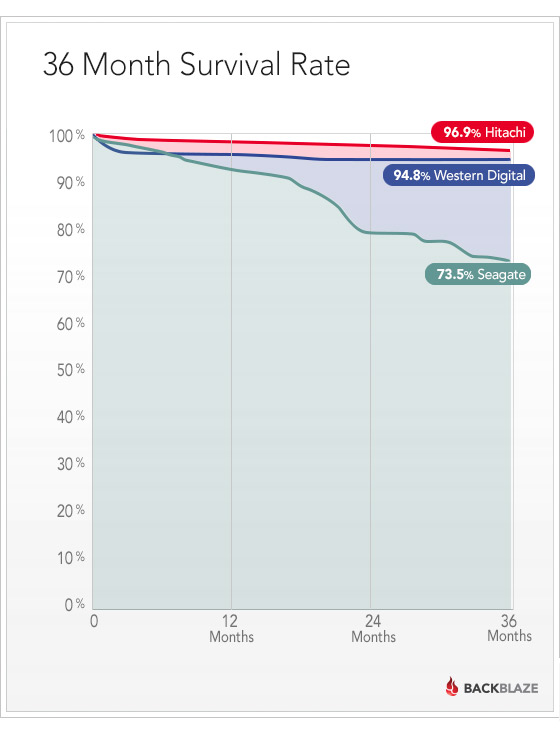
Hitachi does really well. There is an initial die-off of Western Digital drives, and then they are nice and stable. The Seagate drives start strong, but die off at a consistently higher rate, with a burst of deaths near the 20-month mark.
Having said that, you’ll notice that even after 3 years, by far most of the drives are still operating.
What Drives Is Backblaze Buying Now?
We are focusing on 4TB drives for new pods. For these, our current favorite is the Seagate Desktop HDD.15 (ST4000DM000). We’ll have to keep an eye on them, though. Historically, Seagate drives have performed well at first, and then had higher failure rates later.
Our other favorite is the Western Digital 3TB Red (WD30EFRX).
We still have to buy smaller drives as replacements for older pods where drives fail. The drives we absolutely won’t buy are Western Digital 3TB Green drives and Seagate 2TB LP drives.
A year and a half ago, Western Digital acquired the Hitachi disk drive business. Will Hitachi drives continue their excellent performance? Will Western Digital bring some of the Hitachi reliability into their consumer-grade drives?
At Backblaze, we will continue to monitor and share the performance of a wide variety of disk drive models. What has your experience been?